
Docs / Face Recognition And Liveness SDK / Enrol People
Enrol People
Add people to the Face SDK from one to five photos in the dashboard or with the API, what makes a good enrolment photo and how duplicates are caught.
Enrolling turns photos of a person into face templates, so the person can be recognised later. Photos are not stored.
Good Enrolment Photos
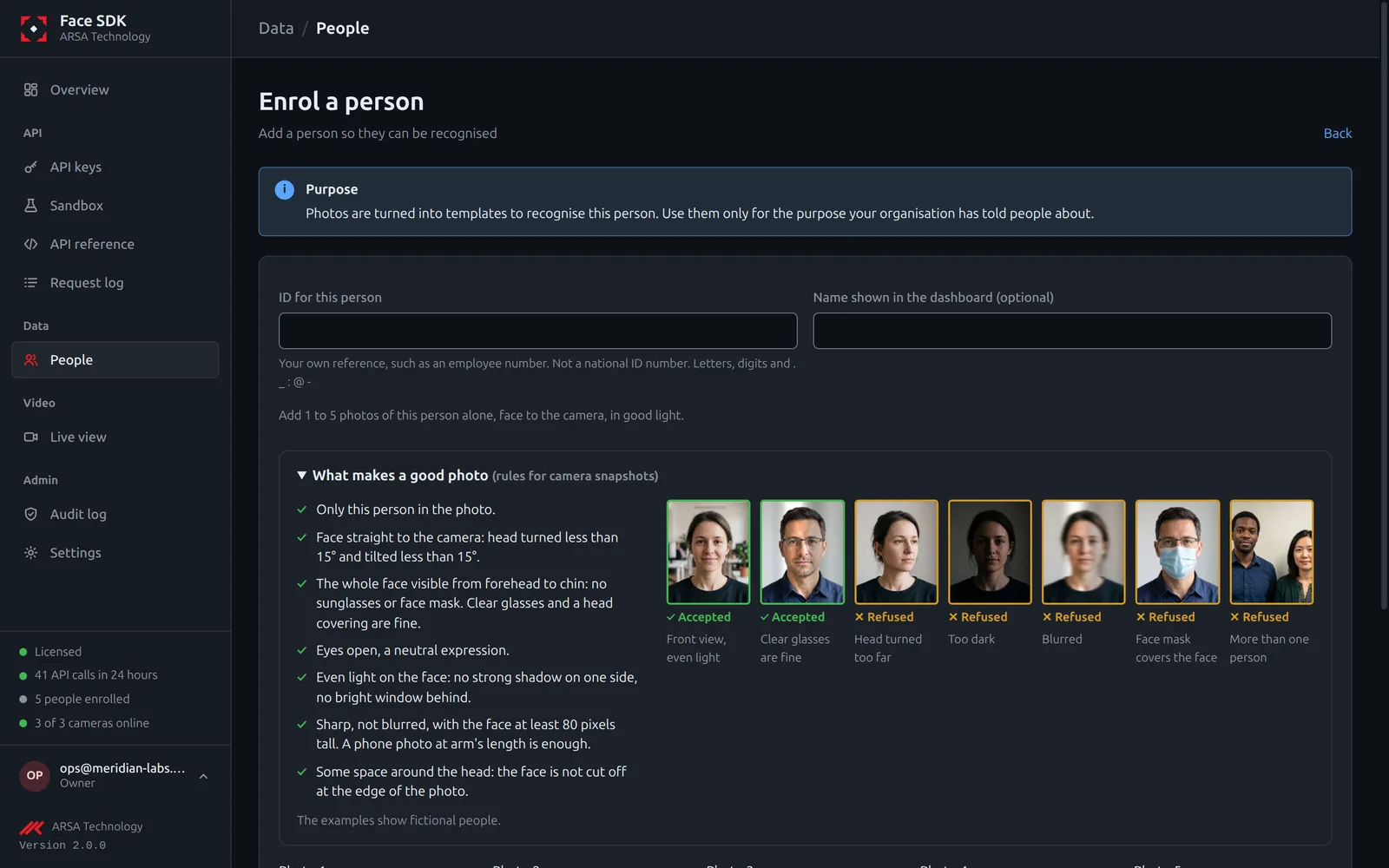
- Only this person in the photo, facing the camera (head turned and tilted less than 15 degrees).
- The whole face visible, from forehead to chin: no sunglasses or face mask. Clear glasses and a head covering are fine.
- Eyes open, a neutral expression, even light, sharp, with the face at least 112 pixels tall. A phone photo at arm’s length is enough.
- Two to five photos of the same person give better results than one.
A photo that does not meet these is refused with the reasons, such as POSE_YAW (head turned) or UNEVEN_LIGHT, and what to change.
In The Dashboard
- Open People and choose Enrol a person.
- ID for this person: your own reference, such as an employee number (letters, digits and
. _ : @ -). Do not use a national ID number. - Name shown in the dashboard: optional.
- Add one to five photos: Upload, Camera (the browser’s webcam) or Use a test photo to try it.
- Tick that the person was told the purpose and agreed, then choose Enrol.
With The API
curl -X POST http://localhost:8080/v2/identities \
  -H "x-api-key: $API_KEY" \
  -F uid=emp-1042 -F display_name="Mei Tanaka" \
  -F image=@mei-1.jpg -F image2=@mei-2.jpg
import requests
r = requests.post("http://localhost:8080/v2/identities",
headers={"x-api-key": API_KEY},
data={"uid": "emp-1042", "display_name": "Mei Tanaka"},
files={"image": open("mei-1.jpg", "rb"), "image2": open("mei-2.jpg", "rb")})
print(r.status_code, r.json())The key needs the enrol permission.
Duplicates
When the face is already enrolled under another ID, enrolment answers 409 POSSIBLE_DUPLICATE. Keys that may also search (identify) see which ID it matched. An admin can enrol anyway with force=true.
Enrolment Strictness
Settings, Enrolment photo rules sets how strict the photo checks are for your organisation: Standard (default), Passport (stricter, like a passport photo) or CCTV (accepts camera snapshots, at lower accuracy). In the API: enrol in PATCH /v2/tenant/policy.
Remove A Person
Delete on the person’s page, or DELETE /v2/identities/{uid}, removes the person and all their templates at once, and records the deletion in the audit log.
API v2. Updated 2026-11-12