


WHAT THIS GUIDE COVERS
A custom enterprise web application is software built for one organisation’s processes, data and permissions, and used in a browser by its staff, partners or customers. Operations, IT and compliance leads usually make the decision together, because the application ends up between the systems they each own. This guide covers what these applications are, when building one beats buying, how they connect to an ERP that is staying put, what security and data residency law asks of them, what they cost, how a rollout runs and how to judge a vendor. Each section links to the article in this series that covers that part in depth.
CONTENTS
Contents
- What A Custom Enterprise Web Application Is
- Why Build A Custom Enterprise Web Application
- The Four Kinds Enterprises Commission
- Integrating With The Systems You Already Run
- Workflows, Dashboards And Compliance Reporting
- Security, Access Control And Data Residency
- Architecture And Technology Choices
- What It Costs And How Long It Takes
- How A Rollout Runs
- How To Evaluate A Vendor
- What Goes Wrong
- Frequently Asked Questions
DEFINITION
What A Custom Enterprise Web Application Is
A custom enterprise web application is a browser-based system designed around one organisation’s own data model, roles and processes, usually integrated with its ERP, CRM or plant systems and hosted where that organisation chooses. It differs from an ordinary web application in its users, the systems it connects to, the permissions it enforces and how long it has to last.
People often search for the difference between an enterprise application and a web application, and the two terms answer different questions. “Web application” describes how the software is delivered: through a browser, without an install on each machine. “Enterprise” describes who it serves and what it has to survive. A marketing site with a contact form is a web application. A purchase approval system used by four hundred staff across three countries, writing into the general ledger and keeping a record auditors can read, is an enterprise web application. Both run in a browser. What separates them is the second one’s obligations.
Those obligations shape every decision later in this guide. An enterprise application has named users with different permissions, so it needs a role model before it needs screens. It moves data that other systems trust, so integrations are part of its core design. It is examined by auditors, regulators and security reviewers, so it keeps a record of who did what and when. And it is expected to run for years, through staff turnover and changes in the systems around it, so whoever maintains it has to be able to read it.
Familiar examples include an internal operations console that brings production, maintenance and quality data onto one screen; a supplier or dealer portal with its own login and pricing rules; an approval engine that replaces signed paper forms; and a compliance dashboard that turns sensor or camera events into reports an inspector will accept.
THE DECISION
Why Build A Custom Enterprise Web Application
Build when the process the software has to support is particular to your organisation, when the data must stay on infrastructure you control, or when per-user licence costs grow faster than the value of the tool. Buy when the process is generic and a package already fits it with configuration alone.
Most organisations already own packaged software for the generic work: accounting, payroll, email, ticketing. The case for building appears in the gaps between those packages, where staff copy figures from one screen to another, approve things on paper or in email threads, or keep the real process in a spreadsheet nobody else can audit. A package designed for thousands of customers rarely fits those gaps exactly, and changing your process to fit the package can cost more than the software.
No-code and low-code platforms sit between the two, and they are often the right first step. A team can prove a workflow in weeks without a development budget. Organisations usually outgrow them in predictable ways: the data model grows past what the platform’s tables handle well, an integration needs logic the connectors cannot express, licence costs rise with every new user, or the security team asks where the data is stored and the honest answer is a region nobody chose. Our article on when a no-code platform stops working for enterprise web applications sets out those limits one at a time, with the signs that a platform has reached them.
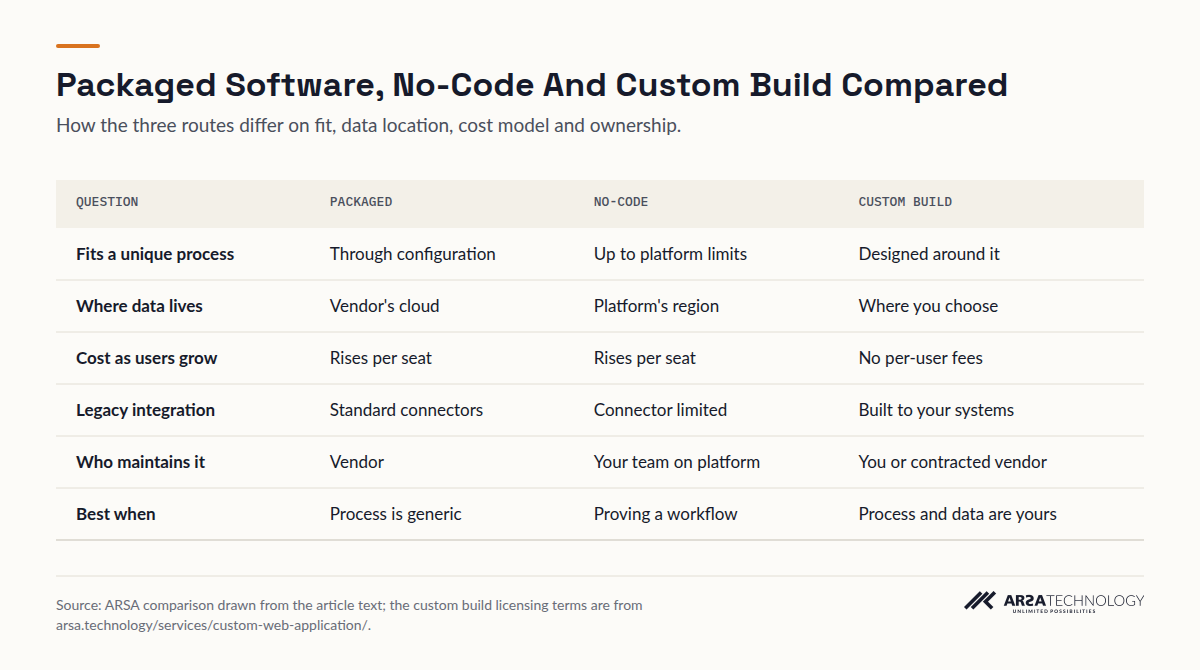
The comparison below summarises the three routes.
View The Data
| Question | Packaged | No-Code | Custom Build |
|---|---|---|---|
| Fits a unique process | Through configuration | Up to platform limits | Designed around it |
| Where data lives | Vendor's cloud | Platform's region | Where you choose |
| Cost as users grow | Rises per seat | Rises per seat | No per-user fees |
| Legacy integration | Standard connectors | Connector limited | Built to your systems |
| Who maintains it | Vendor | Your team on platform | You or contracted vendor |
| Best when | Process is generic | Proving a workflow | Process and data are yours |
There is a case against building, and it should be stated plainly. A custom application is yours to maintain. If the process is common, the package is mature, and your data can legally sit in the vendor’s cloud, buying is usually cheaper and quicker. A good vendor will say so during the assessment.
APPLICATION TYPES
The Four Kinds Enterprises Commission
Almost every enterprise web project falls into one of four types: internal operations platforms, customer-facing platforms, data and analytics platforms, and integration platforms. Many real projects combine two of them, and naming which one leads keeps the scope honest.
Internal operations platforms bring fragmented processes onto one screen: live dashboards that pull from several sources, workflow and approval engines, role-based access with audit trails, and layouts that work on a phone on the shop floor or when the network drops. Customer-facing platforms are the portals and storefronts through which customers, dealers and partners deal with you directly, where page speed, search visibility and payment integration matter more than they do inside the firewall. Data and analytics platforms turn raw operational data into the indicators a manager acts on, with custom visualisations, alerts and scheduled reports. Integration platforms sit underneath the others: the APIs, webhooks and event flows that let systems which were never designed to talk share data reliably.
Whatever the type, three questions decide whether a project is well framed.
Who Uses It
List the roles before any screens: who reads, who edits, who approves, who can see another site’s data. The permission model sets more of the cost than the page count does, and getting it wrong is the commonest source of both security findings and user complaints.
What It Connects To
Name every system the application reads from or writes to, and for each one, whether it has a documented API, a database you are allowed to query, or only files and screens. That one list predicts integration effort better than any feature list.
Where It Runs
Decide early whether it runs on your own servers, in an air-gapped network, or in a cloud region you choose. Hosting changes the architecture, so it belongs in the first week of design. Moving an application on-premise after it was built for a public cloud costs far more.
INTEGRATION
Integrating With The Systems You Already Run
Most custom enterprise web applications exist to put a modern interface and workflow over systems that are staying: an ERP, a CRM, a historian, a document store. The integration is usually the hardest part of the project, and it is mapped before any code is written.
The usual situation is an ERP that works, holds years of transactional history, and is too risky or expensive to replace, while its screens frustrate everyone who uses them. Migrating is rarely the answer. A web layer reads from and writes to the ERP through whatever surface it offers, and staff work in the new interface while the ERP remains the system of record. Where the legacy system has no API, the route might be a read replica of its database, a staging table it already imports from, or a scheduled file exchange. Each carries a different risk to the data. Our guide to building a modern web interface over a legacy on-premise ERP without migrating it walks through those patterns and how to choose between them.
A related problem arises when the CRM and ERP each hold half the picture of a customer and the obvious connector runs through a third-party cloud. For organisations under data residency rules that path can be closed to them, and the integration then has to run inside their own network. A forthcoming article in this series covers connecting CRM and ERP systems without sending customer data overseas.
On ARSA’s engagements, the integration surface is fixed during the feasibility assessment, including where the legacy system has no API and needs a different approach, according to ARSA’s enterprise web application service page. Ask any vendor to show you that map before they price the build.
WORKFLOW AND REPORTING
Workflows, Dashboards And Compliance Reporting
The two most common jobs a custom application does are moving a decision through the right people in the right order, and turning operational data into a report someone accountable will sign. Both depend on an audit trail designed in from the start.
Approval chains are where paper, email and spreadsheets last longest. A purchase request, a change to a maintenance plan, or a credit exception passes through several people, each of whom needs to see the right context, add a signature and pass it on. A web application replaces the folder with a routed record: the request carries its own documents, approvers see only what their role allows, delegation and escalation follow written rules, and the system records each step with a time and a name. Our article on replacing paper approval chains with a custom web application covers how to map the chain as it really runs today, which is rarely how the policy document describes it, and how to handle the exceptions that make paper look easier.
Compliance reporting is the other recurring job. Data arrives from somewhere (sensors, inspections, camera analytics) and has to become a record that satisfies an internal audit or an external inspector. For safety teams in the United States that means records an OSHA inspector can follow. In the United Kingdom it means evidence that sits naturally within HSE guidance, and in Australia and Singapore evidence that supports a duty holder under WHS law or the WSH Act. The application’s work is to keep the raw event, the human review of it, the corrective action and the closure together as one traceable chain. Our article on turning PPE detection data into audit ready compliance reports shows that chain built from camera detections, including what a dashboard should and should not show a site manager.
That article draws on detection data from ARSA’s edge appliances, which is where ARSA’s two product lines meet. ARSA’s own camera standard, ARSA-CVS-001, sets requirements such as 262 PPM for helmet detection and a minimum of 50 lux, so a reporting application built over camera data can only be as good as the camera placement behind it. When a project’s inputs are video, the camera survey belongs in the scope.
SECURITY AND RESIDENCY
Security, Access Control And Data Residency
The commonest serious flaw in web applications is broken access control, where users can see or change records their role should not reach. Data protection law in the markets this guide covers also expects privacy to be designed in, and in some cases limits where personal data may be sent.
The OWASP Top 10, the most widely used list of web application risks, kept Broken Access Control in first place in its 2025 edition, the first new list since 2021, with security misconfiguration moving up to second, as The Register reported at its release. For an enterprise application this is practical advice: authorisation has to be checked on the server for every record and every action, never inferred from what the interface happens to hide. A permission model written down at design time, and tested against during user acceptance, is what prevents that whole class of finding.
Privacy law points the same way. The UK GDPR’s Article 25 requires data protection by design and by default: technical and organisational measures built into processing, and by default only the personal data needed for each specific purpose, a duty the Information Commissioner’s Office explains in its accountability guidance. In practice that means field-level decisions about what each role can see, retention periods enforced by the system, and logs that record access without copying the personal data they protect.
Singapore’s PDPA adds a transfer rule. Section 26, the Transfer Limitation Obligation, bars sending personal data outside Singapore unless the recipient is bound to protect it to a comparable standard, and the PDPC’s advisory guidelines note that the organisation stays responsible when it uses an overseas data intermediary. Buyers in the United Arab Emirates, under the PDPL, and in other regulated sectors face similar questions. An application hosted on infrastructure you control, with integrations that run inside your network, answers many of them by design.
ARSA supports on-premise and air-gapped deployment for its web applications, and its service page reports that most enterprise clients host the application themselves. ARSA’s two public deployment references in this field are Indonesian government systems: a Restricted Area Protection System dashboard for Indonesia’s Ministry of Defense, and PERCIK, a vehicle registration physical check system for the National Police. Both run in environments where the data cannot leave the building.
ARCHITECTURE
Architecture And Technology Choices
There is no single best framework or programming language for enterprise web applications. The right stack is the one your own team, or the team that will maintain the system, can support for the life of the application, built on mature open-source tools with a large hiring pool.
Searches for the best framework or the best language for enterprise work assume a technical answer to what is really an organisational question. Every mainstream web stack can serve thousands of users when it is designed properly. What differs between them is who in your market can maintain them, how well they fit the databases you already run, and whether your security team has already approved them. A vendor who chooses an obscure stack because its own engineers prefer it leaves you dependent on that vendor.
Enterprise web application architecture usually follows a familiar shape: a browser interface, an application layer exposing documented APIs, a relational database as the system of record, a cache and search index where load calls for them, and an integration layer that isolates the application from the quirks of the legacy systems around it. The decisions that matter more than the choice of framework are these: whether the APIs are documented well enough for another team to build on; whether the application is multi-tenant, serving several business units or customers with their data kept strictly apart; whether it has to work offline on the floor; and how it is deployed and monitored. On that last point, containerised deployment with an automated build and test pipeline is now ordinary practice and costs no more to specify at the start.
ARSA builds on mainstream open-source frameworks and on the commercial and open-source databases enterprises already license, and deploys to customer servers or to the cloud provider the customer chooses. The specific stack is agreed during discovery against what the customer’s team can support.
COST AND TIME
What It Costs And How Long It Takes
ARSA’s typical enterprise web application projects run from $20,000 to $250,000 and above, with a functional system in 8 to 16 weeks. The range is wide because scope, integrations and permissions vary that much between organisations, which is why ARSA prices the build only after a paid assessment.
The figures below are taken from ARSA’s published service pages. Treat them as a frame of reference; the assessment produces the actual quote.
| Item | Figure | What It Covers |
|---|---|---|
| Feasibility assessment | $4,500, two weeks | Data model, integration surface and permission model before code; operational diagnosis, cost model, go or no-go |
| Typical project range | $20,000 to $250,000+ | Discovery, design, build, integration, testing, deployment and training |
| Time to a functional system | 8 to 16 weeks | Working modules in staging, from discovery through iterative development |
| Per-user licence fees | None | The application is licensed to the organisation, with no charge per seat |
| Ongoing maintenance | Quoted per system | Usually an annual percentage of project value, agreed before the build |
| Assessment credit | Deducted in full | If the project is contracted within 90 days of the assessment |
Three things move a project within that range more than anything else: the number and difficulty of integrations, the size of the permission model, and whether the application has to run on-premise or air-gapped. Screen count matters less than buyers expect.
Two terms deserve attention in any quote. The first is source code ownership: on ARSA’s projects custom application code is typically handed over, agreed in writing before work begins, while ARSA’s own platform components and reusable libraries are licensed rather than transferred. The second is maintenance, which should be priced before the build, when you still have negotiating leverage, never after go-live.
For buyers outside Indonesia, ARSA’s list prices are in USD and invoicing is available in USD or EUR.
ROLLOUT
How A Rollout Runs
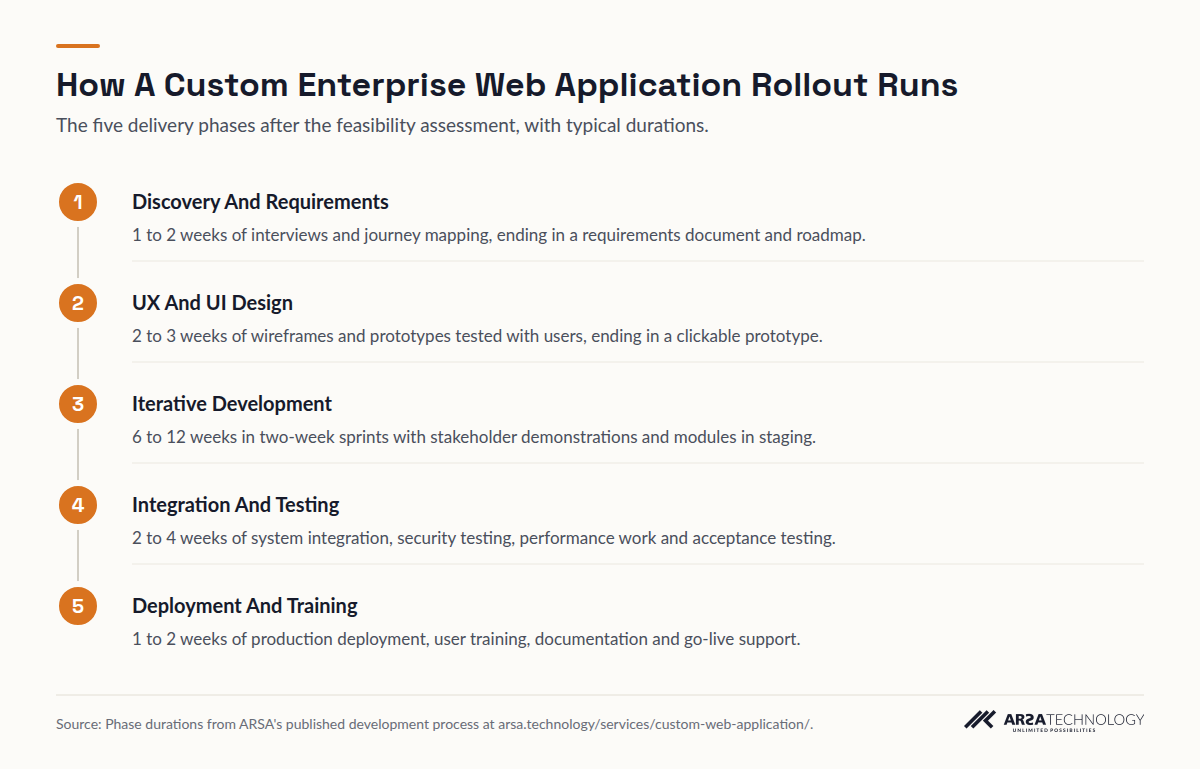
A well-run custom application project moves through five phases: discovery, design, iterative development, integration and testing, then deployment and training. Each phase ends in something you can inspect before paying for the next.
ARSA’s published process gives a typical duration for each phase. Discovery and requirements take 1 to 2 weeks and end in a requirements document and roadmap. UX and UI design take 2 to 3 weeks and end in a clickable prototype that real users have tested. Iterative development takes 6 to 12 weeks in two-week sprints, with a demonstration to stakeholders at the end of each sprint and working modules in a staging environment. Integration and testing take 2 to 4 weeks, covering system integration, security testing, performance work and user acceptance testing. Deployment and training take 1 to 2 weeks and include go-live support and documentation.
Read As Text
- Discovery And Requirements 1 to 2 weeks of interviews and journey mapping, ending in a requirements document and roadmap.
- UX And UI Design 2 to 3 weeks of wireframes and prototypes tested with users, ending in a clickable prototype.
- Iterative Development 6 to 12 weeks in two-week sprints with stakeholder demonstrations and modules in staging.
- Integration And Testing 2 to 4 weeks of system integration, security testing, performance work and acceptance testing.
- Deployment And Training 1 to 2 weeks of production deployment, user training, documentation and go-live support.
Before the first phase comes the feasibility assessment, which decides whether the project should go ahead at all. A paid assessment that ends in a no is a good result: it costs $4,500 and saves the project budget.
The demonstrations every two weeks are the protection a buyer should insist on. They show early whether the vendor understood the process, and they let the people who will use the system correct it while that is still cheap. A vendor who asks to disappear for three months and come back with a finished system is asking you to carry all the risk.
Outside Indonesia, delivery follows the same phases. Discovery, design and development run remotely with scheduled workshops. Where on-site work is needed and visa conditions prevent ARSA engineers from travelling, a qualified local partner carries it out under ARSA supervision.
The checklist below gathers the decisions a buyer should have made, or demanded, at each stage. Print it and work through it with the vendor.
VENDOR EVALUATION
How To Evaluate A Vendor
Judge an enterprise web application vendor by what they deliver before the build: a written integration map, a permission model, a hosting design and a maintenance price. A vendor who quotes a fixed price from a feature list alone has skipped the work that decides whether the project succeeds.
These questions separate a vendor who has delivered enterprise systems from one who has only built websites. Ask how they will connect to each system on your integration list, and what happens to the plan if a system turns out to have no usable API. Ask to see the permission model from a past project, with names removed, and how it was tested. Ask whether they can deploy to your servers or an isolated network, and whether they have done so before. Ask who owns the code, in writing, and which components stay licensed. Ask what maintenance costs, how the price is set, and what response times the support contract commits to. Ask how many people on the proposal will actually write code, and whether you can meet them.
The answers you want are specific. “We’ll figure out the integration in development” is a warning. So is a quote with no maintenance line, an ownership clause that turns up only in the master services agreement, or a stack nobody else in your region can support. A good sign is a vendor who suggests that part of the scope should be bought rather than built.
Look as well at how the vendor handles the end of the project. Documentation, an administrator handover, a staging environment you keep, and training for your own IT staff determine whether you can change suppliers later. Being able to leave is what keeps any long-term relationship with a vendor fair.
FAILURE MODES
What Goes Wrong
Enterprise web projects most often fail through scope that was never fixed, integrations found to be harder than assumed, permissions added late, and nobody owning the system after go-live. Each can be prevented, and each shows up in the first weeks if someone is looking.
Unfixed scope is the classic case. A requirements list that grows every sprint, without anyone weighing each addition against time and budget, overruns gradually and then all at once. The fix is a roadmap with a written trade-off rule: anything new displaces something of equal size, or moves to a second phase.
Late integration surprises come second. A legacy ERP whose “API” turns out to be a reporting export, or a database the vendor of that ERP forbids you to write to, can change the project’s shape in week eight. Mapping each integration and testing it against the real system during the assessment is the only reliable prevention.
Permissions bolted on late cause the security findings described above and frustrate users, who either see too much or cannot do their job. They are cheapest to design before the first screen.
Adoption failure is quieter. An application built from the policy manual, ignoring how work really happens, gets bypassed, and the spreadsheet comes back. Testing with the people who will use the system, during design and at every sprint demonstration, is the protection.
Ownership after go-live is the last risk. An application nobody is responsible for maintaining decays as the systems around it change: an ERP upgrade breaks an integration, a certificate expires, a departing administrator takes the deployment knowledge with them. A maintenance contract agreed before the build, documentation that is actually delivered, and a named internal owner prevent most of it.
FAQ
Frequently Asked Questions
What Is A Custom Enterprise Web Application?
It is browser-based software built for one organisation’s processes, roles and data, integrated with its existing systems and hosted where it chooses. Unlike packaged software, its data model and workflow follow how the organisation works, so staff do not have to bend their process to fit the tool.
Why Build A Custom Enterprise Web Application Instead Of Buying One?
Build when the process is specific to your organisation, when data must stay on infrastructure you control, or when per-user licence fees grow faster than the value. Where a process is generic and a package fits it with configuration alone, buying is usually cheaper, and a straight vendor will tell you so.
How Much Does Custom Enterprise Web Application Development Cost?
ARSA’s typical projects run from $20,000 to $250,000 and above. The integrations, the permission model and the hosting requirement drive most of that spread. A $4,500 feasibility assessment fixes the scope first, and its fee is deducted from the project if you contract within 90 days.
How Long Does It Take To Build One?
A functional system usually takes 8 to 16 weeks on ARSA’s projects, through discovery, design and iterative development. Integration testing, user acceptance, deployment and training follow. A demonstration every two weeks means you see working software long before go-live.
Can A Custom Web Application Work With Our Existing ERP?
Yes, and that is the most common reason to build one. The application reads from and writes to the ERP through its API, a database replica, staging tables or file exchange, depending on what the ERP allows, and the ERP stays the system of record. The route is decided during the assessment.
Can The Application Run On Our Own Servers Or In An Air-Gapped Network?
Yes. ARSA supports on-premise and air-gapped deployment, and most of its enterprise clients host their applications themselves. Hosting is a design decision made in the first weeks, because it shapes the architecture, the integrations and the update process.
Who Owns The Source Code?
For ARSA’s projects, the custom application code is typically handed over to the client, as agreed in writing before work begins. ARSA’s own platform components and reusable libraries are licensed rather than transferred. Get the ownership terms in writing from any vendor before the build starts.
Does ARSA Deliver Outside Indonesia?
Yes. ARSA’s list prices are in USD and invoicing is available in USD or EUR. Most of the work runs remotely, and where on-site work is needed but visa conditions prevent ARSA engineers from travelling, a qualified local partner installs under ARSA supervision.
NEXT STEP
Start With The Architecture
Before anyone writes code, a feasibility assessment sets the data model, the integration surface and the permission model, and gives a written go or no-go. It costs $4,500, takes two weeks, and is deducted from the project fee if you contract within 90 days. Read about the service and the categories ARSA builds on the Enterprise Web Applications page, see how it fits ARSA’s other engagements, or contact ARSA to scope yours.