

How To Manage Edge AI Boxes Across Multiple Sites
This guide takes you from one working pilot to a group of edge AI boxes across a chain of sites. Each box is sized, connected, reports to one place and is kept up to date without an engineer visiting every location. Most of the work is planning. On site, ARSA’s published setup times are 15 minutes to connect a box and 45 minutes to configure it, and new units ship three to four weeks after order.
Read As Text
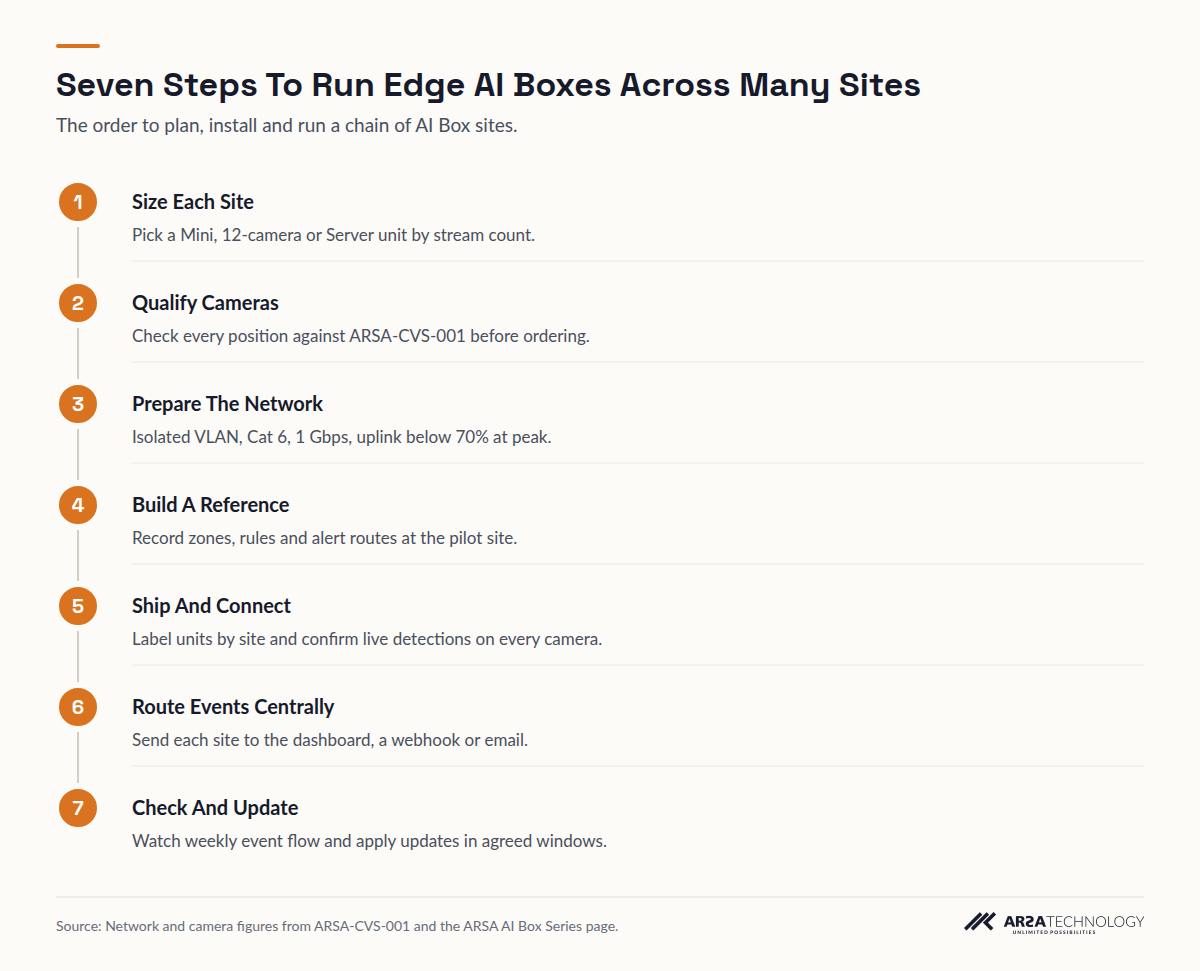
- Size Each Site Pick a Mini, 12-camera or Server unit by stream count.
- Qualify Cameras Check every position against ARSA-CVS-001 before ordering.
- Prepare The Network Isolated VLAN, Cat 6, 1 Gbps, uplink below 70% at peak.
- Build A Reference Record zones, rules and alert routes at the pilot site.
- Ship And Connect Label units by site and confirm live detections on every camera.
- Route Events Centrally Send each site to the dashboard, a webhook or email.
- Check And Update Watch weekly event flow and apply updates in agreed windows.
BEFORE YOU START
What You Need Before The First Box Ships
You need a complete site list, camera details for every location, network access at each site, and named people to approve and receive alerts. Gather these before you order, because a missing camera detail costs a site visit later.
- A spreadsheet of every site with its address, its camera count and the analytics module each camera will run
- For every camera: make, model, resolution, frame rate, codec, mounting height and the distance to the area it watches
- An agreed decision for each site on whether it runs connected to a central dashboard or fully offline
- Network access at each site: a switch port, a VLAN you can assign, and PoE budget figures
- A named site contact who can power-cycle a box and read a label over the phone
- Your alert destination: email list, webhook endpoint or the alerting stack your operations team already watches
- A data protection review of where event snapshots will sit, under UK GDPR, Singapore’s PDPA, the UAE’s PDPL or whichever regime covers each site
STEP 1
Step 1: Size Each Site And Pick The Box That Fits
Assign each site one appliance model based on the number of camera streams it must analyse. Use the table below, and allow for cameras the site expects to add within the contract term.
| Site Profile | AI Box Model | Camera Streams | Typical Location |
|---|---|---|---|
| Small store, single gate, one kiosk wall | Mini | Up to 3 | Behind a display or in a cabinet |
| Mid-size store, depot or yard | 12-camera model | Up to 12 | Comms cabinet |
| Plant, warehouse or campus | Server | Up to 25 | Rack in a comms or control room |
| More than 25 streams | Server Pro | Quoted by stream count and frame rate | Data room |
A chain of 40 small stores with three cameras each needs 40 Mini units, and a single distribution centre with 22 cameras needs one Server. Where a head office already runs servers with spare GPU capacity, you can analyse that site with ARSA’s AI Video Analytics Software and use boxes at the remote sites. ARSA states that both report into one dashboard. You have finished this step when every row of your site list carries one model and one stream count.
STEP 2
Step 2: Qualify The Cameras At Every Site Against ARSA-CVS-001
Check every camera against the published floor before you order: ONVIF Profile S, 2 MP minimum (4 MP recommended), 15 fps minimum and H.264. Then check each position’s geometry.
The specification is not the usual reason a position fails. Distance and angle are. ARSA’s system requirements set the optimal camera tilt at 10 to 25 degrees below horizontal. The maximum is 35 degrees for helmet detection and 40 for vests, and anything steeper than 45 degrees is prohibited. Helmet detection needs 262 pixels per metre, which ARSA reaches at 6.3 m on a 2 MP camera and 8.4 m on 4 MP. Vests need 153 PPM. The scene needs at least 50 lux. The accepted reference case is a camera at 3.5 m, 6.0 m from the subject, tilted 22 degrees.
On a single site you can walk the floor. Across a chain, you cannot. A Remote Camera Design Review costs $1,500, takes one week, and returns a pass or fail for each position from drawings and photos. The fee is deducted from the project fee if you sign within 90 days. You have finished this step when every camera on the list is marked pass, or has a priced fix.
STEP 3
Step 3: Prepare The Network At Each Site
Put each site’s cameras and box on an isolated VLAN, cabled in Cat 6 at 1 Gbps, with the uplink below 70% at peak and 25% headroom on the PoE budget.
Work out the bandwidth before installation day. ARSA’s figures per camera main stream at constant bitrate are 2.48 Mbps at 2 MP and 4.4 Mbps at 4 MP.
| Site | Cameras | Resolution | Stream Load | Share Of A 1 Gbps Link |
|---|---|---|---|---|
| Small store | 3 | 2 MP | 7.4 Mbps | Under 1% |
| Depot | 12 | 4 MP | 52.8 Mbps | About 5% |
| Plant | 25 | 4 MP | 110 Mbps | About 11% |
Video stays on the site network, so a site’s uplink to your head office carries only events and dashboard traffic. Any site where the camera VLAN already runs above 70% at peak needs work before its box arrives. You have finished this step when each site has a VLAN ID, a switch port and a measured peak load.
STEP 4
Step 4: Build One Reference Configuration At The Pilot Site
Configure the pilot box fully, then write down every zone, rule, threshold and alert route, so that every later site starts from the same baseline.
Record the configuration per camera type: a store entrance, a loading bay, a forklift aisle. Include the zone shapes as screenshots, the dwell or count thresholds, and the alert destinations. ARSA ships each appliance pre-imaged and configured. Send the camera list and reference configuration for each site with the order, and ask ARSA which settings can be preloaded before shipping. Your written record is still what lets a local technician check a site against the baseline. You have finished this step when someone who never saw the pilot could configure a second site from your document alone.
STEP 5
Step 5: Ship, Label And Connect Each Site
Label every unit with its site ID before it leaves your goods-in, connect it to power and the camera VLAN, and point it at the site’s ONVIF or RTSP streams.
Lead time is three to four weeks from order, shipped from Surabaya, and the buyer handles import duty, VAT and customs clearance. Plan rollout waves around that. ARSA’s list prices are in USD, and invoices can be issued in USD or EUR. On-site installation labour outside Indonesia is not included in the box price. Where visa conditions prevent ARSA engineers from travelling, a qualified local partner installs under ARSA supervision. Cameras, cabling and PoE switching are outside the box price too. Electrical work and any mast or ceiling mounting need a qualified installer and, on some sites, a permit.
You have finished this step when the local dashboard shows live detections on every camera at that site, matched against your reference document.
STEP 6
Step 6: Route Every Site’s Events To One Place
Decide where each site reports. That can be ARSA’s centralised dashboard, a webhook into your existing alerting stack, email, or the local dashboard alone for a site that must stay offline.
ARSA describes the AI Box as working fully offline in isolated environments or connected to centralised dashboards. Cloud connectivity is optional and off by default. Most chains mix the two: connected sites report centrally, and a sensitive site such as a defence contractor’s yard keeps everything on its own network. Event metadata and detection snapshots are stored locally on each unit. The box analyses video but does not record it, so long-term footage stays in your existing VMS or NVR. For a chain that spans the UK, Singapore and the UAE, this keeps personal data inside each site’s own jurisdiction unless you deliberately route it out. Test each route by triggering a known event at the site and confirming it arrives at the right destination within your agreed response window.
STEP 7
Step 7: Run Health Checks And Updates On A Fixed Cadence
Set a weekly check for every site, and an update window agreed per site, so that a silent box or an outdated model is caught by routine work and not by an incident.
The simplest health signal is event flow. A busy store that produced no footfall events during trading hours has a camera, network or box fault. Set your alerting stack to flag any site whose events stop for longer than one shift. Model updates and remote support need connectivity. A site kept offline receives an offline update package that someone on site loads. NIST’s SP 800-40 Rev. 4 treats patching as planned preventive maintenance with defined maintenance windows, and that approach suits a fleet of appliances well. Software maintenance is included in a subscription and optional on a perpetual licence, so record which sites are on which plan. Every appliance carries a 12-month hardware warranty, and warranty years 2 and 3 are bought separately.
TROUBLESHOOTING
What Goes Wrong Across Multiple Sites And How To Spot It
Most fleet problems come from drift: sites that slowly stop matching the reference you built at the pilot. Weekly checks catch drift early.
The most common case is a camera moved by a store fitter or knocked during cleaning. Its detections continue, but at a lower rate, because the subject now sits beyond 6.3 m on a 2 MP camera or the tilt has passed 35 degrees. Compare each site’s weekly event counts against its own history. A drop of a third with no change in trading is worth a photo from the site contact. Lighting changes cause the same pattern at night: a failed floodlight takes a yard below 50 lux.
The second case is network saturation after another system shares the VLAN. Alerts arrive late or in bursts. Measure the uplink at peak again, and move the other traffic off.
The third case is licensing. If a subscription lapses at one site, ARSA states that the analytics stop and the dashboard shows a licence prompt. The unit and its configuration are kept, and restarting the subscription reactivates them. Treat any licence prompt in your weekly check as a billing task. Nothing has failed in the hardware.
FAQ
Frequently Asked Questions
How Many Cameras Can One Edge AI Box Handle At Each Site?
Up to 3 on the Mini, up to 12 on the mid-size model and up to 25 on the Server. Above 25 streams, ARSA quotes a Server Pro configuration by stream count and frame rate. Size each site separately and leave room for planned additions.
Do The Boxes Keep Working When A Site Loses Its Internet Link?
Yes. ARSA states that detection, alerting and the local dashboard all run offline. Central reporting from that site pauses, and remote support and model updates wait until the link returns or an offline update package is loaded.
How Are Model Updates Delivered To Boxes Across Many Sites?
Connected sites receive model updates over the network, and offline sites receive an offline update package. Ask ARSA how update scheduling works for your number of units, and agree a maintenance window per site before rollout.
Can Remote Boxes And A Central Server Report Into One Dashboard?
Yes. The AI Box and the self-hosted AI Video Analytics Software share one platform and one dashboard. A common pattern runs boxes at remote sites and the software on existing servers at the main site.
Does ARSA Deliver And Install Outside Indonesia?
Yes. List prices are in USD, invoicing is available in USD or EUR, and units ship three to four weeks after order. Where visa conditions prevent ARSA engineers from travelling, a qualified local partner installs under ARSA supervision.
Where Is Video Stored In A Multi-Site Deployment?
In your existing VMS or NVR at each site, because the AI Box analyses streams without recording them. Event metadata and detection snapshots are kept locally on each unit, which helps you keep personal data within each site’s jurisdiction.
GET STARTED
Plan Your Rollout With ARSA
Start with one site and a written reference configuration, then repeat it site by site. The ARSA AI Box Series page covers the Mini, the 12-camera model and the Server, with software licensed perpetually or per camera per month. If your cameras span many locations, a Remote Camera Design Review from ARSA’s services qualifies every position in one week before you commit.