
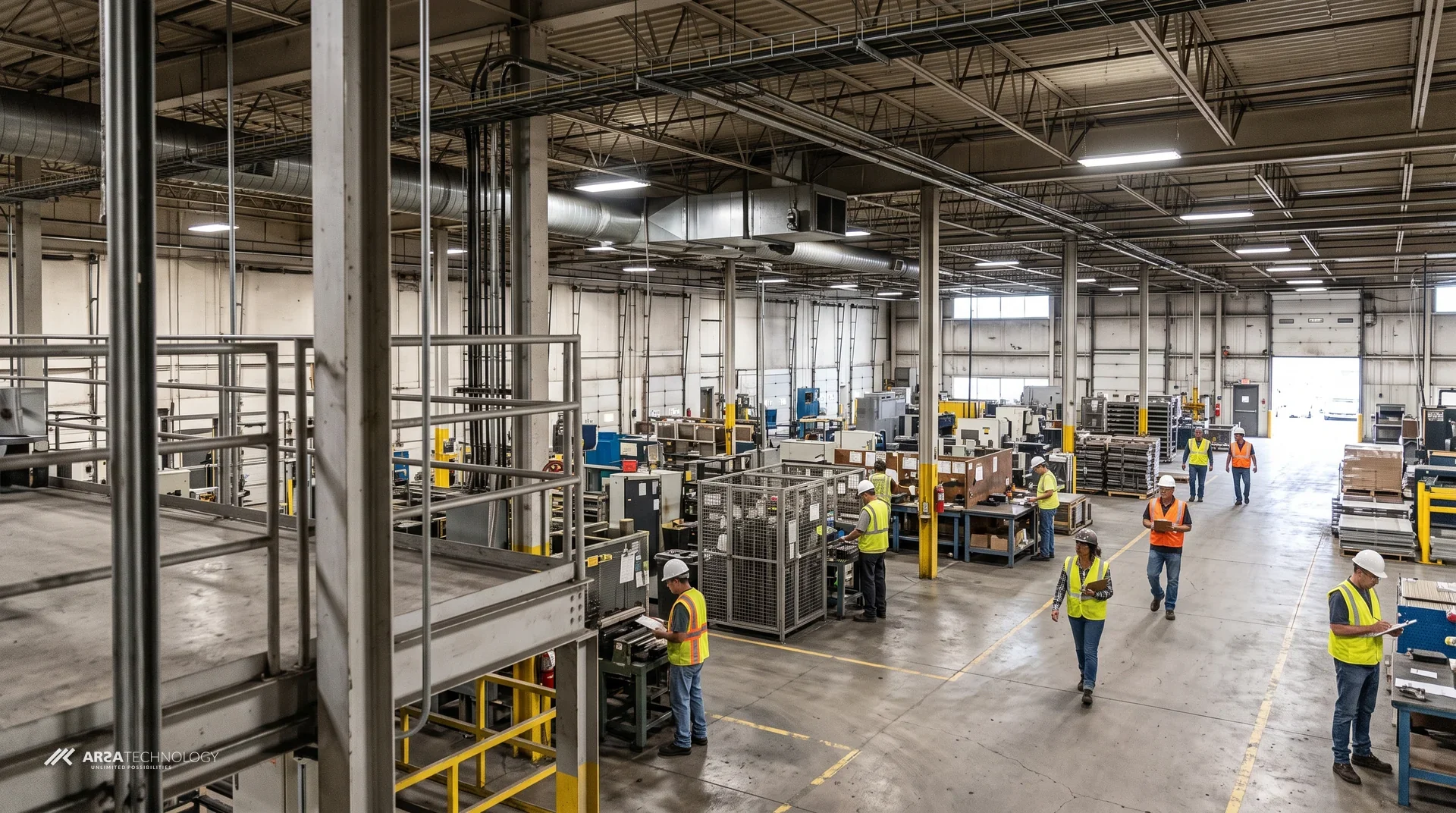

An edge AI box is a small computer that sits on your own network, reads the video from cameras you already have, and turns it into events such as a missing helmet, a vehicle count or a queue over its limit. The video is analysed on site, so no footage has to be sent to anyone else’s servers. Operations, safety, IT and marketing teams usually share this decision, because it touches the cameras, the network, the budget and the data protection file. This guide covers what an edge AI box is, how it compares with server software and cloud analytics, what your site needs, what it costs, how to judge a vendor, how a rollout runs and where rollouts fail.
CONTENTS
What This Guide Covers
Each section below covers one part of the decision. Where another ARSA article covers that part in more depth, the section gives the short answer and links to it.
- What An Edge AI Box Is
- Edge AI Box, Server Software Or Cloud
- How An Edge AI Box Works On Site
- What Your Cameras And Network Need
- What An Edge AI Box Costs
- Privacy, Data Residency And Regulation
- How To Evaluate An Edge AI Box Vendor
- How A Rollout Runs
- What Goes Wrong And How To Avoid It
- Frequently Asked Questions
- Start With Your Own Cameras
DEFINITION
What An Edge AI Box Is
An edge AI box is a pre-built appliance that runs video analytics locally on live camera streams and outputs events, counts and alerts. It analyses video and does not record it. Your existing NVR or VMS keeps doing the recording.
The word “edge” means the computing happens where the cameras are. In a cloud model, video goes out to a data centre for analysis. In a self-hosted software model, it goes to your own GPU servers. An edge box puts that compute in a cabinet, a comms room or a rack on site, so the only things that need to leave the building are events, and only if you send them.
ARSA’s AI Box Series comes in two hardware sizes. The Mini is a compact unit for up to three cameras. It fits behind a display, inside a cabinet or at a single gate. The Server is a rack-mount unit for up to 12 or 25 camera streams and usually sits in a plant control room or comms room. Both run the same four analytics modules: PPE and hazard zones (Safety Guard), people and queues (Retail Counter), vehicles and traffic (Traffic Monitor), and screen audiences (DOOH Audience Meter). Every unit is pre-imaged with a local dashboard, so the first configuration happens in a browser on your own network. The AI Box Series product page has the full module list and hardware detail.
It also helps to know what an edge box leaves out. ARSA’s unit does not supply cameras, switches, cabling or lighting. It does not keep long-term video. It is not designed for certified medical or forensic evidence output. If you need a cloud VMS with storage, you need a different product.
COMPARISON
Edge AI Box, Server Software Or Cloud
An edge AI box suits sites that have cameras but no spare GPU servers or IT staff to run them, and it suits sites that must keep video on premises. If you already run GPU servers, self-hosted software usually costs less. Cloud analytics works when bandwidth is cheap and sending video off site is acceptable.
ARSA offers no cloud inference service. The box and the self-hosted software run identical detection models, so the choice between them depends on who owns and maintains the compute. Accuracy does not change between them. The table compares all three deployment models on the points buyers ask about most.
| Question | Edge AI Box | Self-Hosted Software | Cloud Analytics |
|---|---|---|---|
| Where Video Is Analysed | Appliance on your site | Your own GPU servers | Provider’s data centre |
| Hardware You Maintain | None, the vendor warrants the unit | Servers, GPUs, operating system | Cameras and uplink only |
| Upload Bandwidth Needed | None for analysis | None if servers are on site | A full stream per camera |
| Works With The Internet Down | Yes, by default | Yes | No |
| Best Fit | Sites without servers, fast multi-site rollout | Organisations with GPU capacity and IT staff | Low camera counts with strong uplinks |
| ARSA Entry Price | $1,890 hardware plus licences, or $3,890 one-time | From $25 per camera per month | Not offered |
Bandwidth is the deciding factor most often. ARSA’s software requirements put a 2 MP main stream at 2.48 Mbps per camera and a 4 MP stream at 4.4 Mbps. A 12-camera site at 2 MP therefore needs about 30 Mbps of continuous upload before a cloud service can analyse anything. At 25 cameras on 4 MP, the figure is about 110 Mbps. An edge box needs none of that upload for analysis. It sends events, and only to destinations you configure.
The decision flow below covers most cases. Our earlier comparison of edge AI and cloud AI for enterprise video analytics works through the architecture trade-offs for a CTO audience in more depth.
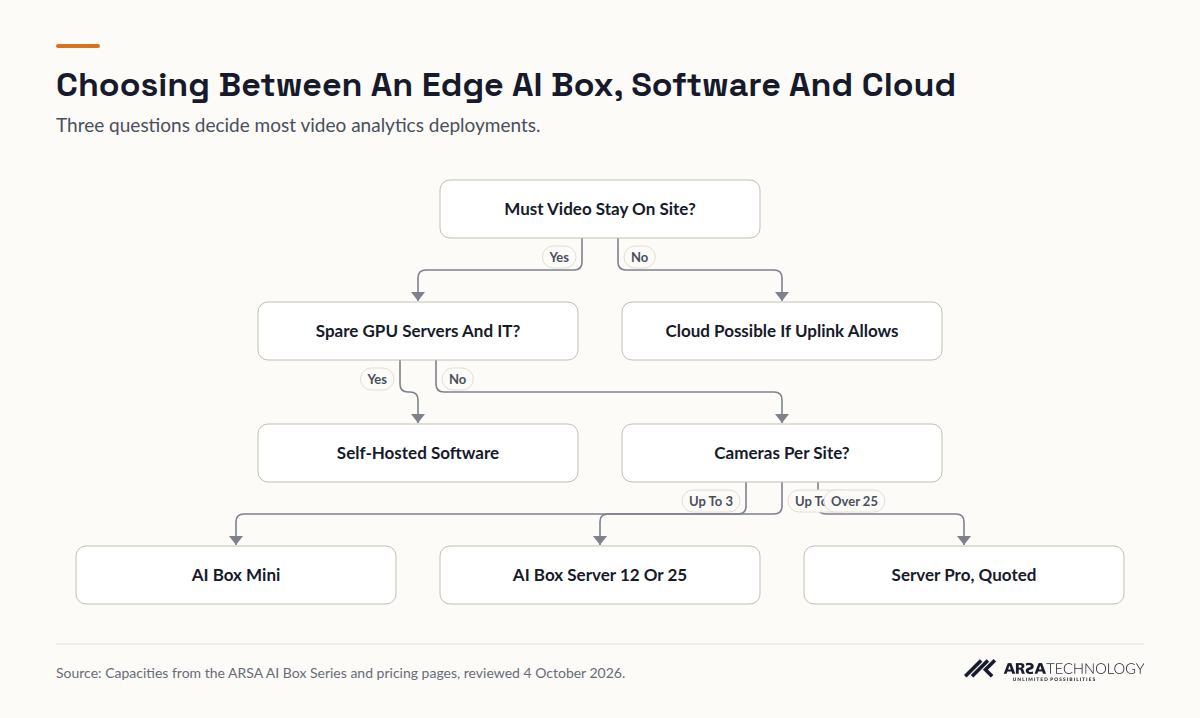
Read As Text
- Must Video Stay On Site? leads to Spare GPU Servers And IT? (Yes)
- Must Video Stay On Site? leads to Cloud Possible If Uplink Allows (No)
- Spare GPU Servers And IT? leads to Self-Hosted Software (Yes)
- Spare GPU Servers And IT? leads to Cameras Per Site? (No)
- Cameras Per Site? leads to AI Box Mini (Up To 3)
- Cameras Per Site? leads to AI Box Server 12 Or 25 (Up To 25)
- Cameras Per Site? leads to Server Pro, Quoted (Over 25)
Mixing the two models is common. Remote sites run boxes, the main site runs the software on existing servers, and both report to one dashboard. Choosing a box for a depot does not stop you running the software at head office.
ARCHITECTURE
How An Edge AI Box Works On Site
The box pulls each camera’s stream over ONVIF or RTSP, runs detection on every frame it needs, compares the results with the zones and rules you drew, and fires an event when a rule is broken. ARSA quotes about 15 minutes to connect a unit and 45 minutes to configure the first zones and rules.
Ingest
The unit reads the cameras’ existing streams from your network, the same way an NVR does. The cameras keep recording to your NVR as before, so adding the box changes nothing in your recording chain. Cameras should sit on an isolated VLAN that the box can reach.
Detect
Detection runs on the box, built with standard deep learning frameworks, in real time and without any post-processing step. For each camera you draw the zones that matter, such as a hazard area, a doorway, a lane or the space in front of a screen, and set the thresholds that make an event worth raising.
Act
Events go to the local dashboard. You can also route them by webhook or email, or into your existing alerting stack. Event metadata and detection snapshots are stored on the unit. With cloud connectivity off, which is the default, the box goes on detecting, alerting and serving its dashboard during an outage.
Offline operation matters most on mines, ports, construction sites and remote plants, where the uplink is weak or shared. Our guide to edge AI video analytics for low-connectivity industrial sites covers those sites in detail, including how updates and remote support work when the link is intermittent. On a fully isolated network, model updates arrive as an offline update package.
SITE REQUIREMENTS
What Your Cameras And Network Need
Most cameras installed in the last several years meet the minimum: ONVIF Profile S, 2 MP, 15 frames per second, H.264. A camera’s distance from the subject and its tilt angle decide whether it can be used for analytics more often than its resolution does.
Pixel density on the subject decides what a model can see. A camera that is fine for watching a car park may be too far away to tell whether a worker 10 metres off is wearing a helmet. ARSA publishes these limits in its camera and site requirements standard, ARSA-CVS-001, on the system requirements page. The figures that decide most camera positions are below.
| Requirement | Figure |
|---|---|
| Camera Protocol | ONVIF Profile S IP camera, RTSP stream |
| Resolution | 2 MP minimum, 4 MP recommended |
| Frame Rate | 15 fps minimum |
| Codec | H.264 High Profile |
| Pixel Density For Helmets | 262 PPM |
| Pixel Density For Vests | 153 PPM |
| Helmet Detection Reach | 6.3 m on 2 MP, 8.4 m on 4 MP |
| Vehicle Counting Reach | 24.9 m on 2 MP |
| Optimal Tilt | 10 to 25 degrees below horizontal |
| Maximum Tilt | 35 degrees for helmets, 40 degrees for vests, steeper than 45 prohibited |
| Lighting | 50 lux minimum |
| Outdoor Cabinet Rating | IP66 and IK08 |
| Network | Isolated VLAN, Cat 6, 1 Gbps, uplink below 70% at peak |
| Power Over Ethernet | 25% headroom on the PoE budget |
| Reference Case | 3.5 m mount, 6.0 m standoff, 22 degree tilt |
Tilt is where existing CCTV most often fails. Security cameras are usually mounted high and aimed steeply down to cover the most floor. A camera looking down at more than 45 degrees sees the tops of heads, which makes helmet and face detection unreliable, so the standard prohibits it for those uses. The lens and field of view visualiser lets you check a position before anyone climbs a ladder.
To plan around the cameras you have, two of our articles take this further. How to add edge AI analytics to an existing CCTV or NVR system explains how the box connects alongside your NVR and VMS. Adding AI detection to CCTV you already have, without replacing cameras explains how to sort your cameras into those that work as they are, those that need re-aiming and those that need replacing.
PRICING
What An Edge AI Box Costs
ARSA’s international list price for an AI Box starts at $3,890 one-time for a three-camera unit with perpetual licences, or $1,890 for the hardware plus a per-camera monthly licence. The price depends on the camera count, which analytics module you run and how you prefer to pay.
You can buy in two ways. A one-time purchase covers the unit, perpetual analytics licences, remote setup and 12 months of updates, support and warranty. With a subscription you buy the hardware once and license each camera monthly, billed annually with a 12-month minimum term. Prices on the ARSA pricing page, as reviewed on 4 October 2026, are summarised below. Some older product and industry pages quote earlier figures, and the pricing page takes precedence over them.
| Unit | Capacity | One-Time, Safety Or Traffic | One-Time, Retail Or DOOH | Subscription Hardware |
|---|---|---|---|---|
| Mini | 3 cameras | $5,190 | $3,890 (Retail) | $1,890 |
| Server 12 | 12 cameras | $19,900 | $14,900 | $5,900 |
| Server 25 | 25 cameras | $39,900 | $29,900 | $10,900 |
Subscription licences are $45 per camera per month for Safety Guard, $39 for Traffic Monitor, $29 for Retail Counter and $25 per screen for the DOOH Audience Meter. On a one-time unit, a second module on the same cameras adds 30% of the unit price. On subscription it adds 40% of the camera rate. Plate recognition is an add-on to Traffic Monitor and cuts a unit’s capacity to one third of its standard camera count.
Here is a worked example. A factory gate with three PPE cameras costs $5,190 one-time on a Mini A. Care is optional from year 2 at 18% of the unit price, which is $934 a year, so three years with Care total $7,058. The same gate on subscription costs $1,890 for hardware plus $135 a month. ARSA’s guidance is to subscribe when your horizon is under four years or the camera count is still changing, and to buy outright when the deployment will run past year five, which is where buying becomes cheaper.
Above 25 cameras, the Server Pro configuration is quoted by stream count and frame rate. If you are sizing between units, use one to three Minis for up to nine cameras, a Server 12 for 10 to 12, and a Server 25 for 23 to 25. If you move from a Server 12 to a Server 25 within 24 months, 50% of the Server 12 price you paid is credited.
The box is only part of the budget. Cameras, switches, PoE, cabling, on-site installation outside Indonesia, third-party VMS licences, long-term video storage, and import duty, VAT and customs clearance are all outside the unit price. Units ship from Surabaya in three to four weeks, ex-works. If you want one supplier for everything, ARSA’s turnkey implementation, starting from $12,000 per site, covers survey, cameras, network, installation, configuration, training and support.
COMPLIANCE
Privacy, Data Residency And Regulation
Processing video on site reduces the number of parties and countries your footage passes through, which makes data protection reviews shorter. It does not remove your obligations as the organisation operating the cameras.
In the United Kingdom, the ICO’s guidance on video surveillance notes that more complex AI-based surveillance systems can process more sensitive categories of personal data. Article 35 of UK GDPR requires a data protection impact assessment for processing likely to result in high risk to individuals, and many UK councils publish CCTV impact assessments that treat new analytics functions as a trigger for one. Singapore’s PDPC sets out CCTV notice and access expectations in its Advisory Guidelines on the PDPA for Selected Topics. In the UAE, Federal Decree-Law No. 45 of 2021, the PDPL, has applied since January 2022 and includes rules on transferring personal data outside the country, as summarised by Middle East Briefing.
An edge box helps with each of these in specific ways. With cloud connectivity off by default, no stream leaves the site unless you configure it to. The only data the unit stores is event metadata and detection snapshots, kept locally. The Retail Counter and DOOH modules report counts, dwell times and anonymous audience estimates, and do not identify anyone. Your impact assessment, signage, retention period and lawful basis are still your organisation’s work. For safety buyers, the PPE module supports the hazard assessment and PPE duties under OSHA’s general PPE standard, 29 CFR 1910.132, and its equivalents under HSE guidance and Australian WHS law, through event logs that can feed an audit. It does not replace the employer’s duty to supervise.
A separate article in this series, Why On-Premise Edge AI Satisfies Data Residency And Privacy Rules, will cover each jurisdiction in detail.
BUYING
How To Evaluate An Edge AI Box Vendor
The best evaluation tests the vendor’s analytics on your own footage, from your own cameras, before you sign anything. Brochure accuracy figures come from someone else’s lighting, angles and distances.
Six questions separate most vendors. First, will the vendor test your recordings for free and return the annotated video and raw detections? ARSA’s free footage assessment does this. Second, does the vendor publish camera requirements with real numbers, such as pixel density, tilt limits and lux, so you can check positions yourself? Third, does the unit work fully offline, and is cloud connectivity off unless you switch it on? Fourth, what happens when you stop paying? On ARSA’s subscription you keep the hardware, the analytics stop, and reactivating restores the same configuration. Fifth, is the price public? List prices let you budget before a sales call. Sixth, which accuracy figures are published, on what data, and with what method? Treat any figure without a stated dataset as marketing.
You should also ask what the vendor does not do. A vendor that clearly states it does not record video, supply cameras or certify forensic output is easier to plan around than one that claims everything.
Buyers outside Indonesia will want to know about delivery. ARSA sells every AI Box configuration internationally. List prices are in USD, and invoicing is available in USD or EUR. Where visa conditions prevent ARSA engineers from travelling, a qualified local partner installs under ARSA supervision.
DEPLOYMENT
How A Rollout Runs
A typical rollout has six stages: assess footage, review camera positions, fix what fails, install, tune, and expand. A single site can go from order to live alerts in about a month, because the hardware lead time is three to four weeks and setup takes hours.
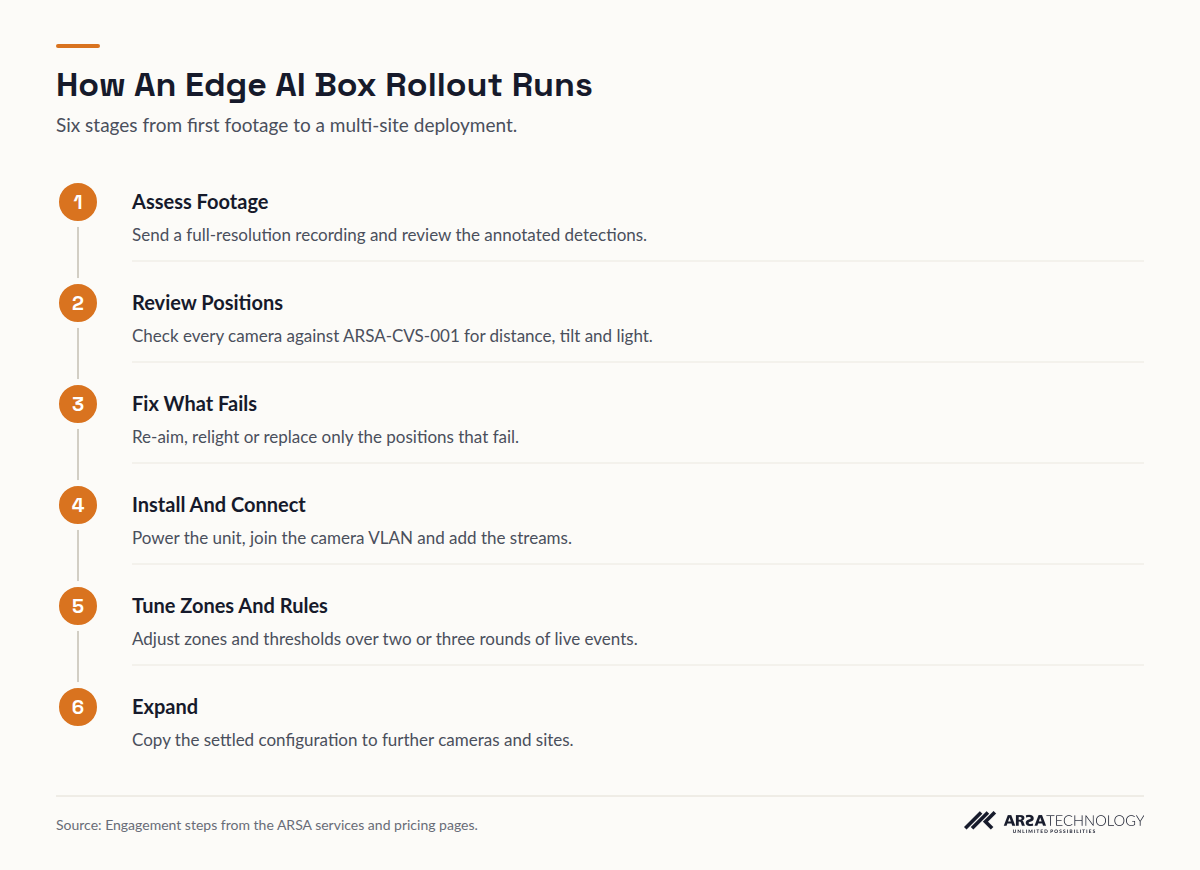
Read As Text
- Assess Footage Send a full-resolution recording and review the annotated detections.
- Review Positions Check every camera against ARSA-CVS-001 for distance, tilt and light.
- Fix What Fails Re-aim, relight or replace only the positions that fail.
- Install And Connect Power the unit, join the camera VLAN and add the streams.
- Tune Zones And Rules Adjust zones and thresholds over two or three rounds of live events.
- Expand Copy the settled configuration to further cameras and sites.
Paid entry steps are credited in full against the project if you contract within 90 days. The Remote Camera Design Review costs $1,500, takes one week, and returns a pass or fail for each camera position against ARSA-CVS-001 with priced remediation. The On-Site Camera Survey costs $4,500 plus travel and covers up to 50 cameras. When the business case itself is uncertain, a $4,500 feasibility assessment produces an operational diagnosis, a cost model and a go or no-go decision in two weeks. A pilot on a bounded scope, measured against agreed KPIs, starts from $20,000 over eight weeks. The services page describes each engagement.
Tuning takes longer than buyers expect. The first week of live events shows where zones are drawn too wide, where a reflection triggers false alerts, and where a camera angle is marginal. Budget time for two or three rounds of zone and threshold changes before judging the system, and only expand to further sites once the first one has stabilised.
The checklist below covers the buying and rollout steps in order, for printing and ticking off.
PITFALLS
What Goes Wrong And How To Avoid It
Most failed edge AI deployments fail at the camera or the network. The model is rarely the cause. The four problems below cause most of the trouble, and each can be checked before purchase.
The first is angle. Cameras mounted for overview coverage often look down steeper than 45 degrees, which rules them out for PPE and face detection. Check each position against the tilt limits before committing to a module. The second is distance. A 2 MP camera reaches about 6.3 m for helmets, so a camera covering a whole bay from one corner may see people without enough pixels to judge their PPE. The third is light. Below 50 lux, detection degrades, and night shifts in yards and loading bays often fall below it. The fourth is the network. A switch already near its limit, PoE with no headroom, or cameras on the office VLAN will drop frames under load. Keeping the uplink below 70% at peak and the PoE budget at 25% headroom prevents most of these failures.
Expectations cause problems too. An edge box raises events. It does not record evidence, so long-term retention stays with your NVR. If nobody owns the alerts, they pile up unread, so decide who responds to each event type before go-live. A safety team that gets 200 alerts on day one will turn them off by day three.
FAQ
Frequently Asked Questions
What Is An Edge AI Box For CCTV?
An edge AI box is an on-site appliance that analyses live CCTV streams and outputs events, counts and alerts without sending video off the network. It connects to existing IP cameras over ONVIF or RTSP alongside your NVR, which keeps doing the recording.
Do I Need To Replace My Cameras To Use An Edge AI Box?
Usually not. ONVIF Profile S IP cameras at 2 MP and 15 fps meet the minimum. Whether a particular camera works depends mostly on its distance from the subject and its tilt angle, which a Camera Design Review checks position by position.
How Many Cameras Can One Edge AI Box Handle?
An ARSA Mini handles up to three camera streams and a Server handles 12 or 25. Larger sites combine units or use a quoted Server Pro configuration. Plate recognition cuts each unit’s capacity to one third.
Is An Edge AI Box Cheaper Than Cloud Video Analytics?
For multi-camera sites it usually is, because cloud analysis needs a continuous upload of about 2.48 Mbps per 2 MP camera plus recurring compute fees, and the box needs neither. If you already run GPU servers, ARSA’s self-hosted software, from $25 per camera per month, is often cheaper still.
Does An Edge AI Box Work Without Internet?
Yes. ARSA’s AI Box detects, alerts and serves its local dashboard fully offline, and cloud connectivity is off by default. Remote support and model updates need either a connection or an offline update package.
Where Is The Video Stored?
The video stays wherever you already store it, which is normally your NVR or VMS. The box analyses streams and keeps only event metadata and detection snapshots on the unit.
Can ARSA Deliver And Install Outside Indonesia?
Yes. Every AI Box configuration is sold internationally at list prices in USD, with invoicing in USD or EUR. Units ship from Surabaya in three to four weeks. Where ARSA engineers cannot travel, a qualified local partner installs under ARSA supervision. Import duty, VAT and customs are the buyer’s responsibility.
What Happens If I Stop The Subscription?
You keep the hardware, because you bought it, and the analytics stop until you resume. Reactivating the subscription restores the same unit and configuration, and nothing is returned or clawed back.
NEXT STEP
Start With Your Own Cameras
The quickest way to find out whether an edge AI box suits your site is to test it on your own footage. Send a full-resolution recording from the cameras you plan to use for a free footage assessment, or book a $1,500 Remote Camera Design Review for a pass or fail on every position. Then size the unit and choose a one-time or subscription licence on the ARSA AI Box Series page, or contact ARSA with your camera count.