
AI Video Analytics For Construction Sites, From The Gate To The Crane
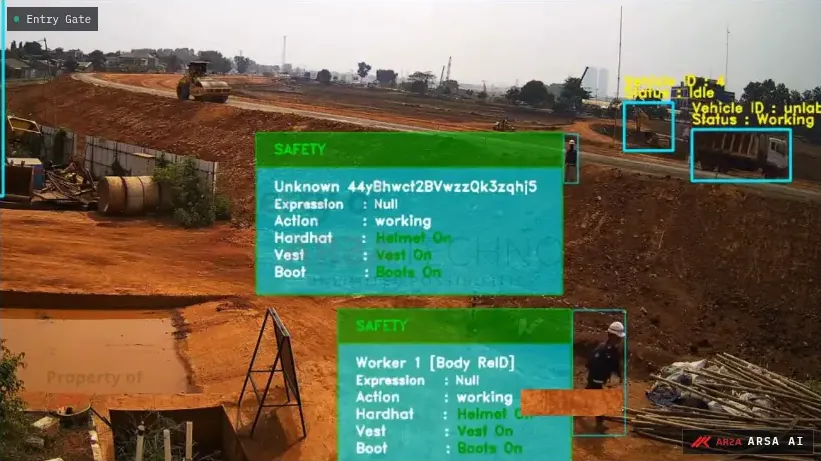
Check helmets and vests on every crew, alert when someone steps into the exclusion zone of a crane, an excavation or working plant, and count the trucks through the gate. An AI Box in the site office does the processing, so it keeps working when the site's internet does not.
Core Applications
What Video Analytics Does On A Construction Site
A construction site changes every week. Crews from many subcontractors share the same ground, the hazards move with the work, and the HSE officer sees only part of it in a shift. Most sites already have cameras on the gate, the hoardings and the tower crane for security. Video analytics reads those cameras, flags the moment a rule is broken, and keeps a timed record of every event.
- Site camera
- AI Box in the site office
- Alert to the site HSE officer
PPE Checks For Every Crew
Helmets, high-visibility vests and safety boots checked at the site gate and in every zone where they are mandatory. Each violation is logged with time, camera and zone, so the main contractor can raise it the same day with the crew in that area.
Exclusion Zones Around Cranes And Excavations
Draw a zone around a crane's lift area, an open excavation or the working radius of an excavator, and the site HSE officer is alerted the moment a person walks in. When the work moves on, the zone is redrawn.
Plant And Vehicles At The Site Gate
A camera on the gate counts every truck, bus, car and motorcycle in and out by direction, and flags a vehicle stopped in the gate approach. Deliveries leave a daily record, with a licence plate add-on where needed.
Challenges
What A Construction Site Deployment Has To Handle
A Site That Moves
A project lasts months, and its cameras move as the frame rises. Zones are redrawn without retraining, each new position is checked against our placement standard, and at handover the AI Box moves to the next project.
Weak Or No Internet
Detection runs on the AI Box in the site office and works with no internet connection. Only events cross whatever link the site has; the video stays on site. Put the box on a UPS with at least 15 minutes of hold-up, somewhere under 35 °C with clear airflow.
Many Firms, One Head Office
Subcontractors come and go, and the main contractor answers for all of them. Every event carries time, camera, zone and a snapshot, and each site's records can go to one head office dashboard.
Camera Placement On A Rising Build
Site cameras are often fixed high on scaffolding, poles or the crane for security, a poor position for PPE. Our camera standard, ARSA-CVS-001, sets the figures every site camera is checked against before a deployment:
- Cameras: 2 MP minimum, 4 MP recommended, at 15 fps or more.
- Size on screen: at least 262 PPM (pixels per metre) at the worker for helmets and 153 PPM for vests; restricted-zone intrusion needs 71 PPM.
- Tilt: 10 to 25 degrees is optimal; up to 35 degrees for helmets and 40 for vests; steeper than 45 degrees is not supported.
- Height: a camera mounted high must sit further back; a 6 metre mount cannot check helmets closer than about 7 metres from its own base.
- Light: at least 50 lux at the work zone for PPE, and 10 lux for exclusion zones after dark.
- Outdoors: IP66 and IK08 enclosures, on a damped pole where the mount is exposed.
Maximum distance with a standard 60 degree lens
A typical working setup is a camera mounted at 3.5 m, 6.0 m from the zone it watches, tilted 22 degrees. One 2 MP camera watches an exclusion zone out to 23.6 m, while helmet checks need a camera within 6.3 m, best placed at the gate and site access points. If one of your cameras falls short, the free AI assessment report says which one and how to move it; the full figures are on the system requirements page.
FAQ
AI For Construction Sites FAQ
Questions main contractors and HSE managers ask before a first site goes live.
Our site has weak or no internet. Will it still work?
Yes. Detection runs on the AI Box in the site office, on the site's own camera network, and needs no internet connection. When a link is available, only the events go on to your head office dashboard, webhook or email. The video stays on site.
What happens when we move cameras as the building goes up?
Zones are redrawn in the interface without retraining. Each new position is checked against the placement standard, because a camera moved higher or further away can drop below the pixel density helmet detection needs.
Can we move the AI Box to our next project?
Yes. The AI Box is a self-contained unit that needs power, a network connection and IP cameras. At the end of a project it moves to the next site, connects to its cameras and gets new zones for the new layout.
Can it alert when someone enters a crane or excavation zone?
Yes. Zones are drawn around a crane's lift area, the edge of an excavation, or the ground where an excavator or piling rig works. A person entering raises an alert to the site HSE officer or the gatehouse, or triggers a siren relay.
Can head office compare compliance across sites and subcontractors?
Yes. Every event is logged with time, camera, zone, detection class and a snapshot, and exports as CSV. Map each zone to a subcontractor's work area, and the records show compliance by area and by site.
Can it count the trucks and plant entering the site?
Yes. Traffic Monitor on the gate camera counts vehicles by direction, classifies cars, motorcycles, buses and trucks, and flags a vehicle stopped in the gate approach. Counting needs 67 PPM, which a 2 MP camera delivers out to 24.9 m; licence plate recognition needs 325 PPM, within 5.1 m. A site with its own servers can run the vehicle counting software instead.
How do I test this on footage from my own site?
Send up to three one-minute clips from your site cameras through the free AI assessment. An ARSA engineer returns an annotated clip, a report with compliance per camera and violations per hour, and a 30-minute call, within 3 business days. If footage cannot leave the site, ask for an on-site assessment instead.
Test It On Your Own Site
Start with the free AI assessment: three one-minute clips return an annotated clip, a report and a 30-minute call within 3 business days. When you are ready to plan a rollout across one site or several, a feasibility assessment measures our models against your site's lighting, camera heights and constraints, and its fee is deducted from the project.
Every deployment follows the same steps: a site survey, a check of each camera against our placement standard, installation of a Basic Safety Guard or Traffic Monitor AI Box in the site office, tuning on your footage and a handover to the site HSE team.
Related reading: automating PPE compliance on construction sites, edge AI for low-connectivity sites, PPE detection in low light and managing AI Boxes across several sites.