
The Complete Guide To Custom Computer Vision Development
Custom computer vision development is the work of building a detection model for one task, at one site and on one set of cameras, where packaged video analytics were never trained for it. The decision usually falls to an operations, safety, quality or IT lead. They have to judge four things: whether the problem needs a custom model at all, what the cameras and network must deliver, where the footage may be processed, and who keeps the model accurate after handover. This guide covers that decision from the first question to a system running across sites, and links to the detailed articles on each part.
IN THIS GUIDE
Contents
- What Custom Computer Vision Development Is
- Custom Models, Packaged Analytics And Cloud Vision APIs
- How A Custom Model Is Built
- What The Site Needs
- Data, Privacy And Where The Video Goes
- What It Takes To Run A Model In Production
- How A Rollout Runs
- How To Evaluate A Vendor
- What Goes Wrong
- How ARSA Approaches Custom Vision Work
- Frequently Asked Questions
DEFINITION
What Custom Computer Vision Development Is
Custom computer vision development means training and deploying a model on classes, conditions and failure modes that belong to one operation. The deliverable is a whole system: the cameras, the training footage, the model, the hardware it runs on, and the integration that puts each detection in front of someone who can act on it.
Packaged video analytics cover the common tasks well. People crossing a line, vehicles in a lane, a missing helmet and a queue at a till are trained into products that thousands of sites share. Custom work starts where the thing to detect belongs to you alone: a burr on a machined edge, a mis-seated connector, a pallet stacked past its limit, or a vehicle type that exists only in your yard. It also starts where the task is common but the conditions are not: steam over a wash line, glare off wet concrete, or a camera that can only be mounted at an awkward angle.
The model itself is often the smaller part of the effort. Most of the work goes into defining what counts as a detection, collecting footage that covers every condition the camera will meet, and connecting the output to the systems operators already watch. If you are still deciding whether your task falls outside packaged analytics, Custom Computer Vision For Detection Tasks Off-The-Shelf Software Cannot Handle works through the kinds of task that do and explains why general models miss them.
BUILD OR BUY
Custom Models, Packaged Analytics And Cloud Vision APIs
There are three routes. Packaged analytics fit when the task is common. A cloud vision API fits when the task is generic and images may leave your network. A custom model fits when the object, the defect or the conditions are specific to you, or when footage has to stay on site. Many estates use more than one route, and the honest first question is whether the task needs a custom model at all.
| Route | Fits When | Where Video Is Processed | Who Answers For Accuracy On Your Site |
|---|---|---|---|
| Packaged video analytics | The task is common (people, vehicles, PPE) and your cameras meet the vendor's specification | On site or in the vendor's cloud, depending on the product | The vendor, within its stated camera conditions |
| Prebuilt cloud vision API | Images may leave your network and the task is general labelling or text reading | The provider's data centres | You, because the provider supplies a general model |
| Trainable cloud vision service | You hold labelled images and may send them to the provider | The provider's data centres | You and whoever labels and trains |
| Custom model at the edge | The object, defect or condition is specific, or footage must stay on site | Your own hardware, next to the cameras or in your server room | Whoever the contract names, with a measured target per camera |
Searches for "custom vision vs computer vision" mostly come from cloud product naming. In Microsoft Azure, one service analyses images with prebuilt models and a second, trainable service lets you upload labelled images to teach it your own classes. Both run in the provider's cloud. They differ in who defines the classes, and processing happens in the same place for both. A model developed for your site is a different thing again: it is trained on your footage and usually deployed on hardware you control.
Where footage may be processed often settles the choice before accuracy comes into it. Custom Computer Vision Vs Cloud Vision APIs: Why Data Residency Decides Build Vs Buy sets out how residency rules, bandwidth and per-call costs weigh on that decision.
Sometimes the right answer is not to use vision. For counting tagged stock through a dock door, a reader may do the job with less to maintain. Computer Vision Vs RFID And Barcode For Asset And Inventory Tracking compares the three for tracking work and shows where each one breaks down.
HOW IT WORKS
How A Custom Model Is Built
A custom model is built from footage of the real site. Each class is labelled to a written definition, the model is trained with standard deep learning frameworks, and it is validated on footage from the same cameras that it never saw during training. Accuracy depends mostly on how precisely the classes are defined and how well the footage covers real conditions. The choice of algorithm matters less.
The work starts with a written class definition. "Defect" is too vague to label. "A surface scratch longer than the width of the label edge, visible under the line lights" is something two labellers will mark the same way. Where they disagree, the definition is fixed before more footage is labelled, because a model trained on inconsistent labels learns that inconsistency.
Footage collection covers what the camera will actually see: every shift, every lighting change, the seasons where the sun reaches the lens, and the rare events. Rare events cause the most trouble. A defect that appears once in many thousands of parts may need deliberate collection, staged examples or a longer capture window before there is enough to train on.
Validation is where projects are honest or not. Measure on held-out footage from the deployment cameras, report each camera separately, report night separately from day, and agree beforehand which number counts: missed detections, false alarms per shift, or both at the operating threshold. A figure from a public benchmark says little about your line at 6am in poor light.
The target hardware is a design input from the start. A model that needs a data centre GPU is no use on a cabinet in a car park, and compressing it later costs accuracy you have already paid to earn.
For manufacturing, two articles in this series go further. How To Build AI Visual Inspection For Manufacturing Defect Detection walks through an inspection build step by step on a production line. Custom Computer Vision For Automated Visual Inspection And Defect Detection covers when inspection needs a custom model and what imaging it depends on.
SITE REQUIREMENTS
What The Site Needs
The site has to put enough pixels on the target, from a usable angle, under enough light, and over a network that carries the stream without loss. When the information is missing from the image, no model can recover it, so the camera survey comes before the model.
The governing number is pixel density, written PPM: how many pixels the camera places across one metre of the scene where the detection has to happen. It falls as one over distance. Under the ARSA-CVS-001 camera and site standard, a 2 MP camera with a standard lens gives roughly 275 PPM at 6 m and 137 PPM at 12 m. Helmet detection needs 262 PPM, so that camera works for helmets at 6 metres and fails at 12. No configuration changes that.
| Task | Pixel Density Needed | Reach At 2 MP | Reach At 4 MP | Optimal Tilt Below Horizontal |
|---|---|---|---|---|
| Vehicle detection and counting | 67 PPM | 24.9 m | 33.3 m | 15 to 35 degrees |
| Restricted-zone intrusion | 71 PPM | 23.6 m | 31.4 m | 15 to 40 degrees |
| Hi-vis vest present or absent | 153 PPM | 10.9 m | 14.5 m | 10 to 25 degrees |
| Safety helmet present or absent | 262 PPM | 6.3 m | 8.4 m | 10 to 25 degrees |
| Licence plate reading | 325 PPM | 5.1 m | 6.8 m | 10 to 25 degrees |
| 1:N watchlist match | 533 PPM | 3.1 m | 4.2 m | 5 to 15 degrees |
The reach figures assume a standard 60 degree lens; a narrower lens roughly doubles them while halving the width covered. A custom task sets its own density. A defect a few millimetres wide needs far more than a helmet, which is why a custom project measures its requirement during feasibility and does not borrow one from a table. The lens and field of view visualiser shows how lens choice trades reach against coverage.
Angle is the most common reason an otherwise good camera fails. For tasks that look at a person, 10 to 25 degrees below horizontal is optimal, the maximum is 35 for helmets and 40 for vests, and anything steeper than 45 degrees is unusable for PPE or faces. That is because the wearer's own body hides what the model needs to see. The standard's accepted reference case is a 3.5 m mount at a 6.0 m standoff with a 22 degree tilt.
Light and camera settings come next. PPE tasks need at least 50 lux at the target. Infrared gives a monochrome image, so any rule that depends on colour stops working at night unless the scene has white light. The camera floor is 2 MP at 15 fps, with 4 MP recommended. Smart codecs should be off on the analytic stream, bit rate constant, and the stream pulled from the camera itself wherever possible, because many recorder re-streams are transcoded, drop frames and shift in time. A recorder's main-stream RTSP re-stream is accepted after the Camera Design Review confirms it is not transcoded. On the network side, put cameras on an isolated VLAN, keep camera to processor latency under 20 ms and packet loss under 0.1%.
DATA AND PRIVACY
Data, Privacy And Where The Video Goes
Where the footage is processed decides which privacy obligations apply and how hard they are to meet. Processing on site keeps footage inside a boundary the organisation already controls and audits, and only events and counts leave the cameras' network.
In the United Kingdom, the Information Commissioner's Office treats video surveillance as processing under the UK GDPR and the Data Protection Act 2018. The ICO and the Surveillance Camera Commissioner have published a data protection impact assessment template for surveillance camera systems, with specific cautions for biometric capability. A model that identifies people by face handles special category data, so the impact assessment belongs before deployment.
In Singapore, the PDPA applies to footage of identifiable people, and the PDPC's Advisory Guidelines on the PDPA for Selected Topics cover CCTV notices and access requests. In the United Arab Emirates, Federal Decree-Law No. 45 of 2021 lets personal data leave the country only under conditions tied to the destination's level of protection, as summarised by the US International Trade Administration. The United States has no federal equivalent, though state biometric laws such as Illinois's Biometric Information Privacy Act carry real litigation risk for face-based systems. Australia's Privacy Act, together with state workplace surveillance laws such as the one in New South Wales, governs cameras that watch employees.
A defect inspection camera that only sees parts raises fewer of these questions than a camera at a gate. Many custom projects still capture people incidentally, and training data counts as processing too. Agree where training footage is stored, who labels it, and when it is deleted, in the same document that sets the accuracy target.
OPERATIONS
What It Takes To Run A Model In Production
A model in production needs someone measuring its accuracy on live footage, a way to retrain it when conditions change, and a contract that says who does both. Accuracy falls after go-live because the site changes around the model: a camera is knocked, a light is replaced, a new product variant reaches the line, or racking blocks part of a view.
Why Computer Vision Models Lose Accuracy After Deployment explains the causes of drift and how to detect it before operators stop trusting the alerts. In practice, running a model comes down to three responsibilities.
Measure Accuracy On Live Footage
Sample a fixed number of events from each camera on a schedule and have a person mark each one right or wrong. Track false alarms per shift and missed events found in audits. A falling trend is the early warning, and it appears weeks before anyone complains.
Retrain On What Changed
When a measurement falls, collect footage of the new condition, label it to the original definitions, retrain, and validate against the old held-out set as well as the new one. That proves the fix did not break what already worked.
Name One Owner In The Contract
Accuracy with no named owner gets nobody's attention. The contract should name who audits, who retrains, how quickly, and what happens when a camera is moved and its zone has to be surveyed again.
ROLLOUT
How A Rollout Runs
A sound rollout goes through a camera and site review, a feasibility assessment that ends in a written go or no-go, a bounded pilot measured against agreed KPIs, and then production across sites. Each stage produces something the next stage uses, so nothing is surveyed or built twice.
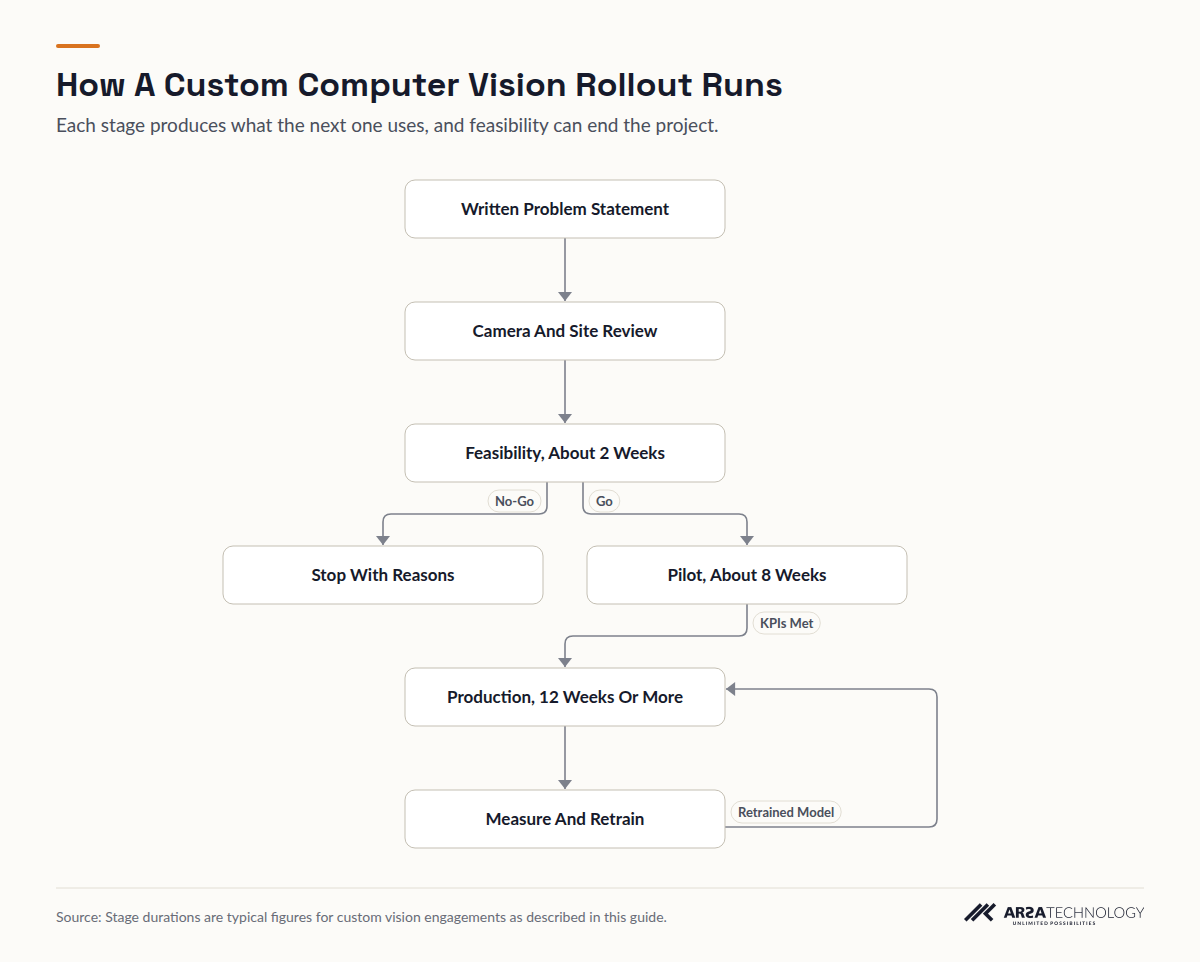
Read As Text
- Written Problem Statement leads to Camera And Site Review
- Camera And Site Review leads to Feasibility, About 2 Weeks
- Feasibility, About 2 Weeks leads to Stop With Reasons (No-Go)
- Feasibility, About 2 Weeks leads to Pilot, About 8 Weeks (Go)
- Pilot, About 8 Weeks leads to Production, 12 Weeks Or More (KPIs Met)
- Production, 12 Weeks Or More leads to Measure And Retrain
- Measure And Retrain leads to Production, 12 Weeks Or More (Retrained Model)
The camera review checks every position against the task's pixel density, angle and light, and returns a pass or fail for each with a remedy where one exists. The feasibility assessment, typically about 2 weeks, tests the task on sample footage, sets the accuracy target, describes the integration and states the payback case. It should be allowed to say no. A pilot, typically about 8 weeks, runs on a bounded scope: a few cameras, one line or one gate, measured against KPIs written down before it starts. Production, 12 weeks or more depending on the estate, extends the model to every site, connects it to the video management system, access control, ERP or alerting, trains operators, and starts the monitoring routine described above.
Why so many pilots stall before production is the subject of a forthcoming data article in this series. The short answer is that most pilots never had production criteria agreed at the start.
VENDOR EVALUATION
How To Evaluate A Vendor
Judge a vendor on four things: whether they check your cameras and site before quoting accuracy, whether they test on your footage, whether they put in writing who owns the model and who maintains it, and whether they will tell you when a project is not worth building. A vendor that quotes accuracy before seeing a camera is quoting a lab figure.
Ask where processing runs and whether it works with no internet connection. Ask whether the model can run on hardware you already own, and what happens if that hardware is too small. Ask for the validation method in writing: which footage, which metric, at which threshold, and reported for each camera. Ask who owns a model trained only on your data, and what stays with the vendor. Ask what the support commitment covers and how quickly a drifting zone is retrained.
Payback depends on a short list of factors you can estimate before talking to anyone: how much of the task is manual today and at what labour cost; whether the outcome is cost avoided or revenue gained and how directly it can be attributed; how many sites the same model will serve once built; whether existing cameras and network meet the specification or need capital work; and the support needed to hold accuracy over time. A model that serves twenty sites pays back very differently from one that serves a single line.
The checklist below collects the rollout and evaluation steps in one place, ready to print and tick through with a vendor.
FAILURE MODES
What Goes Wrong
Most failed vision projects fail on the problem definition, the data, the cameras or the handover, and fewer fail on the model itself. The patterns are well documented and can be avoided once you know them.
RAND's 2024 report The Root Causes Of Failure For Artificial Intelligence Projects, based on interviews with 65 experienced data scientists and engineers, cites estimates that more than 80% of AI projects fail, about twice the rate of other IT projects. It names five root causes: a misunderstood problem, too little training data, chasing new technology over the user's problem, missing infrastructure for data and deployment, and problems too hard for the technique. Gartner's July 2024 forecast that at least 30% of generative AI projects would be abandoned after proof of concept by the end of 2025 blamed poor data quality, weak risk controls, rising costs and unclear value. The technology is different, but the pattern is the same.
In vision projects, four failures recur. A model validated on public data meets conditions it has never seen. Cameras positioned for a guard watching a monitor are wrong for machine detection. Nobody designs the integration path, so alerts land in a separate screen nobody watches. And nobody owns accuracy after handover, so drift goes unmeasured until operators stop trusting the system. Range is the most common camera failure: ARSA-CVS-001 records a camera at the correct angle with a 4 mm lens at 14 m delivering 96 PPM against a 262 PPM helmet requirement. Only a longer lens or a second camera fixes it, and model tuning cannot.
ARSA
How ARSA Approaches Custom Vision Work
ARSA Technology runs custom vision work as an assessment before any code is written, and says so in writing when a project is not viable. The work begins with a Remote Camera Design Review completed in one week, or an On-Site Camera Survey of up to 50 cameras. That is followed by a feasibility assessment, a pilot deployment on a bounded scope, and turnkey implementation where the site needs cameras and network as well. Models run on customer infrastructure by default, at the edge or on servers the customer owns. Customer data stays the customer's. A model trained only on a customer's data for their use case is typically theirs to use, while the base architecture and pretrained weights remain ARSA's. ARSA's deployment references include a Restricted Area Protection System for Indonesia's Ministry of Defense and licence plate recognition with VIN tamper detection for Indonesia's National Police. ARSA delivers outside Indonesia, and where visa conditions prevent its engineers from travelling, a qualified local partner installs under ARSA supervision.
FAQ
Frequently Asked Questions
When Does A Project Need A Custom Model?
A project needs a custom model when the object, defect or behaviour is specific to your operation, or when the site's conditions differ sharply from what packaged models were trained on. If the task is people, vehicles, helmets or queues under ordinary conditions, packaged analytics usually cover it. Run a feasibility test on your own footage before deciding, because a packaged model that works in a demo can still fail at your camera positions.
What Is The Difference Between Custom Vision And Computer Vision?
Computer vision is the field, and "custom vision" usually names a cloud service where you upload labelled images to train your own classes. In Microsoft Azure, the prebuilt vision service and the trainable Custom Vision service both run in the provider's cloud. Custom computer vision development goes further: the model is trained on footage from your cameras and is usually deployed on hardware you control, along with the integration and support around it.
Can A Custom Model Run On Our Existing Cameras?
Often, yes, as long as each camera meets the task's pixel density, angle and light requirements. A 2 MP camera at 15 fps is the usual floor, and distance matters more than sensor size: under ARSA-CVS-001, a 2 MP camera handles vehicle counting to 24.9 m but helmet detection only to 6.3 m. A camera review returns a pass or fail for each position before any commitment.
How Long Does It Take From Assessment To Production?
Plan for roughly half a year from a first assessment to production across sites. Typically that means about 2 weeks of feasibility, an 8 week pilot and a production programme of 12 weeks or more. A camera review can come first, and data collection for rare events can lengthen the pilot.
Who Owns A Model Trained On Our Footage?
Ownership is a contract term and should be agreed in writing before work starts. A common arrangement is that your data stays yours, a model trained only on your data for your use case is yours to use, and the vendor keeps its base architecture and pretrained weights. Settle storage and deletion of training footage in the same agreement.
Why Does Accuracy Drop After Go-Live?
Accuracy drops because the site changes after the model was validated: lighting, camera position, products, seasons and dirt on the lens. The fix is routine measurement on live footage, retraining on what changed, and a named owner for both. Treat any zone whose camera has been moved as unvalidated until it is checked again.
Should Video Be Processed On Site Or In The Cloud?
Process on site when footage shows people, when residency rules limit where personal data may go, or when bandwidth to the cloud is limited. On-site processing keeps footage inside your network and sends out only events and counts. Cloud processing can suit generic tasks on images that carry no personal data and may leave your network.
What Should A Feasibility Assessment Produce?
A feasibility assessment should produce a written go or no-go, backed by a technical judgement against your real site conditions, an accuracy target per camera, an integration design and a payback case. A no-go with its reasoning is a successful assessment, because it saves the project budget.
For a reader who wants to see how this is done in practice, Custom Computer Vision Development describes the work in more detail, and you are welcome to get in touch if you would like a second opinion on your cameras.